

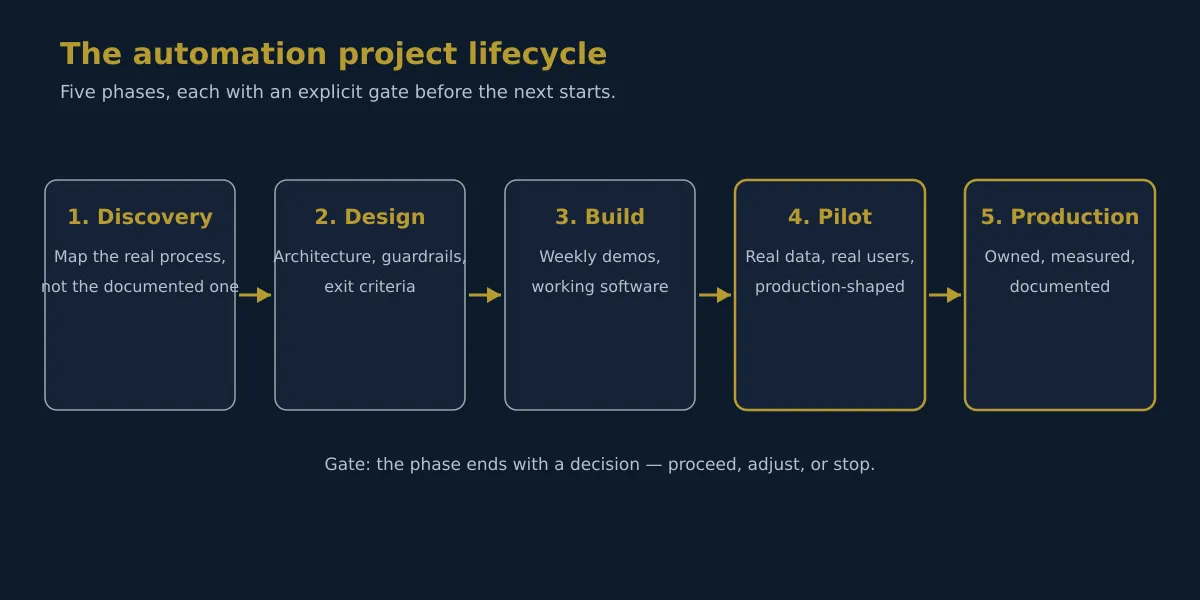
There are two versions of every automation project: the one on the slides and the one that runs. The slide version is a pipeline: data goes in, automation happens, results come out. The running version is messier. It has gates, exceptions, owners, and the occasional moment where a model confidently classifies a supplier invoice as a payment reminder. This post is about the running version: the five phases we take every automation project through, what each gate actually checks, and the design decisions that decide whether the system is still running a year later.

Phase One: Discovery
Every automation project starts the same way: with a process nobody can fully describe. The documented version lives in a policy PDF; the real version lives in the heads of the people doing the work, including the exceptions they’ve built over the years.
Discovery is where we sit with those people. Not their managers. The people who actually process the invoices, enter the data, and route the requests. We map three things:
- The happy path: the 80% of work that flows the way the process says it does.
- The exceptions: the 20% that doesn’t. The handwritten invoices, the missing fields, the supplier who changed their legal name mid-year.
- The dependency on people: who knows what, and what breaks when they’re on holiday.
The most dangerous assumption in automation is that the process is what the documentation says it is. It never is.
The gate for this phase is simple: we can name every input, every output, every system the process touches, and every exception type. If we can’t, the project doesn’t move forward. It moves sideways, into more discovery.
Phase Two: Design
Design decides whether the automation is a tool the team trusts or a system the team works around. Four decisions dominate:
Scope. What the automation may touch, and what it may not. Money over a threshold, compliance-relevant records, and anything customer-facing get designed out of the autonomous path by default.
Guardrails. The automation operates inside a defined boundary. It can’t reach systems, data, or actions outside its scope, no matter what it “thinks” it should do.
Human checkpoints. Where judgment is required, the workflow pauses. An invoice over $5,000 doesn’t pay itself; it queues for a person. This isn’t bureaucracy. It’s what makes the system safe enough to leave running.
Exit criteria. How we’ll know the pilot worked. The metric is defined before the model is trained: error rate on real data, time per transaction, exceptions per hundred.
The gate: the design is written down, the owner is named, and the exit criteria are agreed, before any code is written.
Phase Three: Build
Build is the phase where most projects drift, because “progress” gets confused with “activity.” We run it on weekly demos: every Friday, the client sees working software doing the real task on real data. Not a slide deck about the software. The software.
Two things get caught by this rhythm that don’t get caught any other way:
- The data is wrong in ways nobody knew. The first demo surfaces the 23% duplicate records and the conflicting addresses. Week one, that’s a conversation. Month four, that’s a crisis.
- The process is different in production. What looked like a field on a form is actually a convention everyone follows except the new hire. The weekly demo shows it, because the demo uses real inputs.
The gate: the build passes the exit criteria agreed in design, on real data rather than a validation set.
Phase Four: Pilot
The pilot is where automation projects die quietly, in what we call pilot purgatory. The model works, the demo impresses, and nothing ships. The pattern is always the same: the pilot ran on exported spreadsheets, the production system needs live integration, and that turns out to be another project nobody budgeted for.
Our rule: the pilot is production-shaped from day one. Same systems, same permissions, same data the production system will use. If that means integration work comes first, integration comes first. There is no spreadsheet phase.
The other pilot rule: the person who will run the system in production is in the room from the first week. No handoff at the end. The operator grows up with the system.
The gate: the pilot either ships, dies with a documented reason, or is extended with a new question. It never just “continues.”
Phase Five: Production
Production is where the design decisions pay off. The system doesn’t run on its own. It runs with a human in the loop, and that’s a feature, not a limitation:
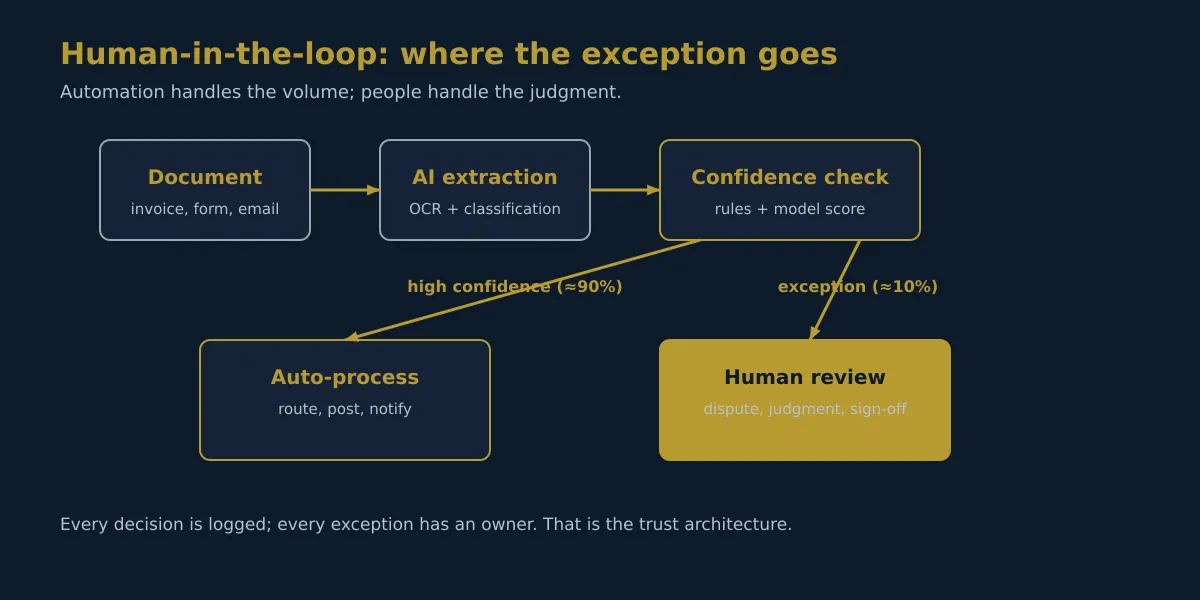
The logic is simple: the automation handles the volume, and people handle the judgment. High-confidence items process automatically: routed, posted, notified. The exceptions, like a disputed invoice or the first contact with a new supplier, go to a person, with the machine’s reasoning attached.
Three things keep this running:
- Audit trails. Every action the machine takes is logged the way a human’s would be. “Who did this?” always has an answer.
- Exception metrics. The exception rate is monitored like a vital sign. If it climbs, something changed upstream. A supplier changed formats, a process changed, the model drifted. The system is designed to surface that, not hide it.
- A kill switch. The workflow can stop cleanly and hand back to the team. Systems that can’t be stopped get stopped anyway, in the worst possible way.
Where Automation Projects Die
We were asked to rescue enough stalled projects to know the failure pattern by heart. The causes, in order of frequency:
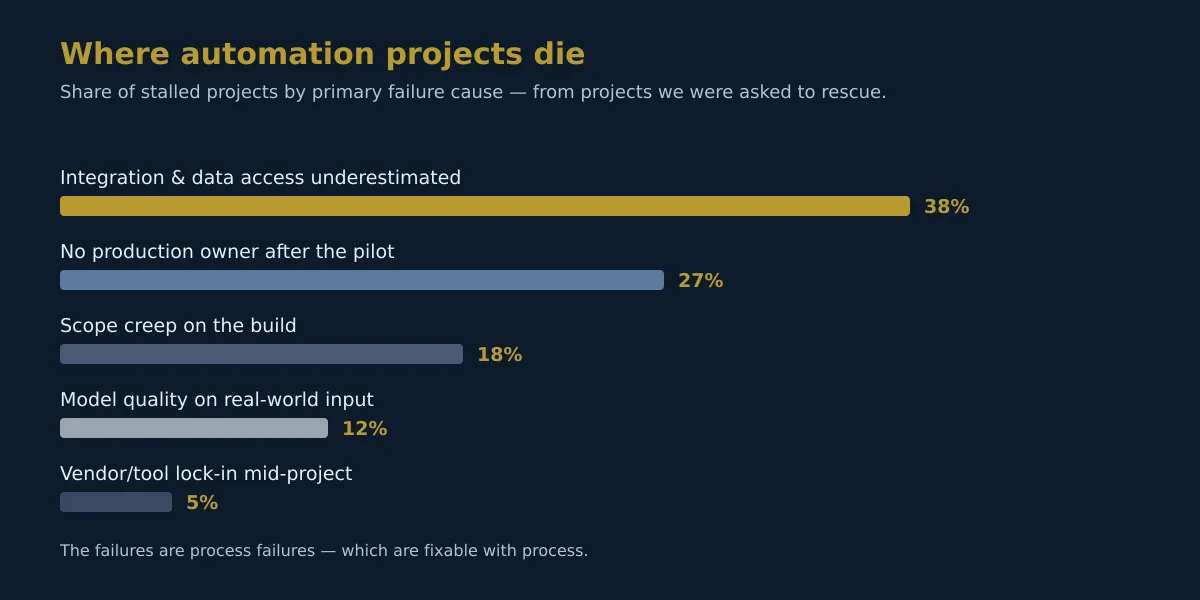
Integration underestimated (38%) is the biggest killer by far. The pilot ran on exports, and production needed live systems. No owner (27%). The champion sponsors the pilot, but nobody owns the production system, so it evaporates when priorities shift. Scope creep (18%). The build grows feature by feature because the exit criteria were never written down. Model quality (12%). Real-world input differs from the test data. Vendor lock-in (5%). A tool choice made mid-project that couldn’t be undone.
The technology isn’t on that list. The failures are process failures, and those can be fixed with process.
Summing It Up
An automation project that survives contact with a busy department has five things: a real process mapped in discovery, a trust architecture designed up front, weekly demos during the build, a production-shaped pilot with a named owner, and a human-in-the-loop design with audit trails and a kill switch.
If you’re about to start an automation project, or you’ve got one stuck in pilot purgatory, book a discovery call. We’ll tell you which phase you’re actually in, and what the gate needs before the next one opens.